Have you ever seen the film Koyaanisqatsi? It’s a 1992 experimental non-narrative arthouse film, and the title comes from a Hopi word that translates to something like “a world out of order” or, more literally, “chaotic life.” That’s sort of the feeling I get when I watch this viral video of a cop car and an ambulance from Cliffside Park, NJ.
I don’t necessarily think the world is completely out of order, but it’s definitely at least suggested by this strangely evocative short video. The video starts with a shot of the police Explorer well and truly crunched into a guardrail/signpost, and a delivery of the classic “you can’t park there, mate” joke. Objectively, the person shooting that video was as compelled to say that as they would be to say “that’s not going anywhere” after strapping something to the roof of a car.
The videographer is already enjoying the schadenfreude of the crashed cop car when the ambulance arrives, which leads to, well, I’ll just let you watch. Oh, I should note there are some uses of a word here that can be used as a slur, though in this context and with benefit of the doubt granted to the speaker, I don’t think that’s what’s intended here. Still, consider yourself warned. Okay, here you go:
Wow, right? The way those chips of the shattered taillight of the Explorer just come flying up like a bunch of Doritos flung out of a bowl is just sublime. And the sounds the ambulance makes as it scrapes along that cop car, and then the more crunching and scraping sounds it makes as it backs up in an attempt to extract itself all just add to the glorious sense of a situation that is deeply, richly boned.
The narrator’s teasing demand for a field sobriety test at the beginning and the shrill and very understandable inquiry of “what the fuck is going on today?” just add to the perfection of this just-over-a-minute masterpiece of documentary reporting.
Local news reporting outlet and frequent monitor of police and emergency services in the Cliffside Park area, HRG News & Resources, contacted Cliffside Park Police, who confirmed that, happily, there were no serious injuries, and the whole thing was an accident, noting “that’s why they call them accidents,” though I’m not really sure that statement actually tells us that much at all.
I mean, I kind of gathered crashing a police SUV into a guardrail and then damaging it further by running an ambulance against it like a colossal cheese grater wasn’t a carefully planned operation. No shit it was an accident.
I think why the video seems to resonate with so many people is because it shows police and emergency responders as vulnerable and fallible as any of us, and there’s a certain strange freedom in the layers of fucking up demonstrated in the video, with emergency and official vehicles all participating in delivering a massive helping of clusterfudge on your plate, and everyone playing their part in this incredible dance that is a shitshow at the fuckfactory.
The natural state of everything is entropy, after all. Maybe there’s a relief, sometimes, in having bits of that revealed to us. And that’s what we find so amusing.
I’ll end this with the trailer for Koyaanisquatsi, because why not.
Comcast reportedly plans significant job cuts in its cable division as the firm continues to lose residential broadband and TV customers. Comcast lost 144,000 residential broadband customers in Q3 2026, up from a 91,000-customer loss in the same quarter a year ago, the company said in its earnings report today.
Comcast historically capitalized on a lack of competition for high-speed wired broadband. But now it faces stronger competition from fixed wireless providers and from fiber providers in parts of its cable territory.
"Fixed wireless remains aggressive and continues to take share, while fiber construction remains elevated, with pockets of irrational pricing and promotional activity," Comcast co-CEO Mike Cavanagh said today in an earnings call.
Comcast CFO Jason Armstrong said "irrational pricing" from fiber operators includes $30 to $40 monthly broadband offers "in specific markets in the third quarter." He said $30 to $40 pricing is irrational because deploying fiber costs $1,500 or more per home, and is "getting more expensive with construction costs up as you get into more suburban and rural areas."
"As we look at the return profile of that, to us, that is irrational competition," Armstrong said. While he didn't name any specific competitors, Verizon has been pitching FiOS fiber plans that start at $30 a month. Comcast's network is a mix of fiber and cable, and it offers fiber-to-the-home in only small portions of its cable territory.
Armstrong said more Comcast customers are leaving when they face "pricing transitions," apparently referring to the price hikes customers get when promotional offers expire. "We've been refining our offers and retention strategies to better manage these transitions and strengthen customer retention," he said.
Cavanagh said that "satellite is not yet a material factor" in the competition Comcast faces, but that Comcast is focused on "anticipating emerging forms of competition and positioning our business to respond as the market evolves."
Fewer jobs, more AI agents
After the latest quarterly drop, Comcast has 28.3 million residential broadband customers in the US. Comcast said it has a plan to turn things around.
"We've embarked on the most significant operating and cost transformation in our company's history, with an opportunity we believe will ultimately amount to billions of dollars over time," Cavanagh said. The organizational changes will result in a "significant charge" of over $1 billion to be applied in the fourth quarter earnings report, Armstrong said.
It appears likely that job cuts will affect Comcast's famously frustrating customer service division, replacing some number of humans with AI agents that already handle some customer interactions. "As personal AI agents reshape how consumers discover, purchase, and manage services, we're positioning Comcast to capitalize on that shift," Armstrong said.
As is typically the case when companies announce layoffs, Comcast said the goal is not merely reducing salary. Cavanagh said Comcast's plan "goes well beyond cost savings" and will "create a more agile, efficient organization that can compete more effectively and invest more decisively in growth."
Comcast lost 274,000 video customers in the quarter, up from a 257,000-customer loss in the same quarter last year. Total video customers are down to 10.4 million. Comcast added 368,000 wireless lines, down from a 414,000-line gain last year. It now has 10.6 million wireless lines in its business of offering mobile service to broadband subscribers.
Job cuts target cable division
Bloomberg reported yesterday that "Comcast is planning a significant number of job cuts as part of an overall restructuring of its cable-TV, broadband and wireless businesses." A Variety report today said the number of job cuts isn't yet determined but that "the layoffs are expected to affect the Comcast Cable side of the business, not NBCU divisions," referring to Comcast's NBCUniversal subsidiary. Comcast did not provide any specifics on job-cut plans when contacted by Ars today.
Comcast also plans to split itself into two publicly traded companies through a spinoff of NBCUniversal and Sky. The spinoff plan was announced in June and is expected to be completed in mid-2027. Comcast's company-wide revenue was $29.3 billion in the third quarter, down from $31.2 billion the previous year. Net income rose from $3.33 billion to $3.45 billion.
Comcast's stock price increased today after beating analyst expectations for its overall earnings, which included a profit from its Peacock streaming service. But it lost more broadband customers than expected and gained fewer wireless lines than expected.
"Comcast’s connectivity-and-platforms revenue fell 2.6 percent in constant currency in the third quarter, to $19.66 billion," The Wall Street Journal wrote. "That was a steeper loss than what Wall Street had expected. The company also added fewer domestic wireless lines than it did a year earlier, missing analyst estimates."
Comcast's total broadband subscribers rose every quarter for 20 years until it reported a net loss of 10,000 residential broadband customers in Q2 2022. In Q1 2025, a net loss of 183,000 residential broadband customers caused Cavanagh to bemoan that the company isn’t “winning in the marketplace."
Comcast tried to turn things around by providing unlimited data on plans that previously had monthly data caps and by offering a five-year price guarantee. Its five-year price guarantee plans start at $45 a month before taxes and fees. Customer losses continued despite those changes.
Free wireless lines and AI customer service
Comcast provides free wireless lines for a year to its broadband customers, but said this is not an irrational offer. "When we offer a free wireless line, it is against zero capital deployed," Armstrong said, noting that Comcast resells mobile capacity instead of building its own cellular network. "We don't have spectrum. We don't have towers. Our model is an MVNO [Mobile Virtual Network Operator] model."
Obtaining mobile capacity through Comcast's MVNO agreement with Verizon isn't free, of course. But Armstrong said Comcast customers who receive a free wireless line for a year "are converting into paying subscribers within a year to a very rational price point, we think, and our goal is obviously to upsell them over time."
The price of a basic Comcast mobile line goes from free to $30 a month after one year and requires a bundle with Comcast home Internet. Armstrong said Comcast is "converting 70 percent of those free lines into paying relationships."
Armstrong also discussed Comcast's plan to increase use of AI agents to interact with customers. It's up to customers to determine whether this improves service or makes things worse, but it will apparently be cheaper for Comcast.
"AI is already embedded across our network to optimize performance, and we're expanding its application across customer experience through partnerships with Sierra and Cresta," Armstrong said. "These capabilities are central to our new operating model, enabling us to bring products to market faster, simplifying customer interactions, and deliver a better experience more efficiently. We've already reduced customer service contact rates by roughly 20 percent and eliminated more than 30 million service interactions year-to-date versus the prior year."
Some Roku OS users have been sad to learn that their favorite screensaver will no longer be available as of December 1.
This week, affected users reported receiving an alert on their device that they will not be able to use the “Aquatic Life” screensaver after this month, as first reported by Cord Cutters News.
The screensaver has been an option for Roku OS users for 10 years. Roku has been licensing the animation, which is called the Marine Aquarium, from artist Jim Sachs through Prolific Publishing.
Sachs is the creator and copyright holder of the Marine Aquarium. He developed the screensaver through his company SereneScreen. He tells Ars Technica that the licensing agreement with Roku is up for renewal every October and can be canceled by either party for any reason. A day after learning that Fox was planning to buy Roku, a deal that closed today, Sachs told Prolific that he wouldn’t be renewing Roku’s license.
“I can’t be part of the Fox world,” he tells Ars, pointing to Fox News’ controversial style of news and entertainment.
Roku will automatically switch the Aquatic Life screensaver on affected devices to the Roku City screensaver, another popular animation that includes subtle advertisements, according to the user notice.
The Aquatic Life screensaver provided an ad-free, relaxing display for years for some Roku users. Numerous people online have lamented the impending loss of the screensaver for Roku OS .
“When my head is in overdrive (very often with my ADHD), this screensaver grounds me and lets me exhale and become focused with myself again. It may sound over the top, but it's true. It takes a lot for me to chill and relax, but this Aquatic Life [screensaver] is my go to. Totally gutted ,” a Reddit user wrote this week.
Sachs told Ars he's interested in placating fans of the Marine Aquarium and said Roku has asked him to restore the license. When asked what his biggest concerns about Fox buying Roku are, Sachs said:
It seems that Fox simply wants another venue for spreading their philosophy, which I consider repugnant. I can’t stand the idea of my artwork being used to lure even one person down that rabbit hole.
The decision to not renew the licensing contract has “major financial consequences,” Sachs said.
“Our needs are very small, with a high property tax bill being the only significant expense,” he said. “We’ll be okay but can’t start any of the projects I had planned.”
According to Sachs, the licensing “agreement was $80,000 per year for exclusive rights to all set-top devices, or $60,000 per year for non-exclusive. They have always opted for exclusive.” Ars asked Roku to confirm the details of the licensing agreement but didn’t hear back ahead of publication.
The licensing deal with Roku was Sachs’ primary form of income, he told Ars, noting low sales of the version of the screensaver for computers.
Marine Aquarium fans can still buy the screensaver for Windows, macOS, iOS, and Android, but it seems unlikely that it will return to the Roku platform.
“One of the best reasons to buy Roku was the themes and less ads than competitors. But they haven't added any new themes in years aside from sponsored ones, and they increased the amount of ads,” a Reddit user posted this week in response to Roku's loss of the Aquatic Life screensaver.
Sachs, meanwhile, says he has “no delusions” that pulling the license will have any meaningful impact. However, he’s hopeful that another streaming company will look to offer the screensaver.
“I’m assuming that Fox will not be reversing their whole rage-based business model and take responsibility for all the harm it has caused. I’d be happy to restore the license under those circumstances. They could even have it for free,” he said.
There’s never just one right way to do things. I know this is something that most of us have long understood, but sometimes it’s easy to forget, as we can tend to fall into ruts of doing things one particular way. The way we think of cars can be like this. There’s certain establish solutions to the problems cars aim to solve, and once we find solutions that work, we tend to repeat those solutions, over and over. But what happens when circumstances force you to think in new ways? That’s when interesting things happen.
The cars I want to talk about today absolutely found other ways to solve their problems. In the case of these cars, the problem was how to be a family car. Now, by “family car” I mean something pretty specific: how to seat four people in a vehicle with a bit of room for luggage, and allow for each group of two – usually divided between parents and children – to have their own door.
I know there have been plenty of cars that were used as family cars that didn’t exactly meet these requirements – the Volkswagen Beetle, for example, was used as a family car by millions (my own family included), but if you wanted to let the kids out of the back seat, someone up front had to get out and flip the seat forward. The two cars I’m discussing now – the BMW 600 and the Zündapp Janus – did not have this restriction, and they were even smaller than the Beetle.
Before I get too deep into these microcar weeds, I should remind you that I’m talking about these cars because our Autopian co-Founder Beau has them, and is considering selling one or both of them. That’s right! It’s an other episode of Should I Sell It?
Both of these cars are from postwar Germany, right at about the time when the economy was just starting to pick up again in the later 1950s, but definitely not prosperous, at least not yet. There was still a demand for simple, cheap transportation, especially cars that could hold a family of four, at prices below even that of the ubiquitous Beetle.
The constraints of the economy pushed carmakers to try novel design approaches, ones that didn’t even really feel like cars, as they are generally understood. BMW, for example, found itself after the war with a lineup of luxurious vehicles that precisely nobody was buying. They needed something dirt cheap to make and sell, used as little fuel as possible, yet was still somehow usable. They found their answer in an Italian company that used to make refrigerators: Iso.
Iso was once Isothermos, the maker of fridges, and the car the company came up with to meet Italy’s postwar trasport demand seemed like a fridge itself, with one big front-opening door. The fridge wasn’t the actual inspiration for this design – it just made sense from an economic standpoint, as it was one door that exposed both seats instead of requiring two – but it was a funny coincidence.
The resulting car was unlike anything really seen before: an egg with a front door, enclosing a bench ahead of a small engine, all propped on four wheels, the rear ones set quite close together. The odd layout worked, and BMW took notice of the car, and the company ended up licensing the body design from Iso, buying the tooling, and then made their own modifications, including adapting one of BMW’s more powerful motorcycle engines for the car.
The resulting BMW Isetta proved to be a hit, and was just what the company needed: a car they could actually sell. Eventually, BMW refined the design into a bigger, somewhat up-market family car, the 600, which now featured two rows of seats, and a door for each row:
The BMW 600 was a packaging marvel, and in many ways can be considered the ideal minimal expression of a four-seater car. It’s smaller than a BMC Mini, but easier for the four passengers to get in and out of, and surprisingly roomy inside.
The rear-mounted flat-twin BMW motorcycle engine made about 20 hp, pretty good for the scale of the car and the era, and while the 600 was a very clever, if quirky design, the market in Germany was tending to want less quirkiness, as the slow recovery after the war was allowing for more traditionally-designed sorts of cars.
But that’s boring! And not every carmaker got pressured out of making weird cars. Some leaned into it, hard, like motorcycle maker Zündapp.
Zündapp never built cars before – and never would again – but the Janus was worth making an exception for. In 1954, Zündapp decided they needed to branch out into more weather-protected vehicles, which meant a car instead of a motorcycle. Zündapp reached out to aircraft maker Dornier, who had built a prototype car called the Delta, a strange little trapezoid of a car that featured upward-opening hatches at both ends.
The Delta was a genuinely novel design: engine in the middle, seats at either end, facing in opposite directions. It was unexpected, but really sort of brilliant, offering a surprising amount of room for people in a remarkably minimal envelope. Zündapp took the concept and refined it a bit, making the side doors side-opening and making the styling a bit less alien-shed-looking:
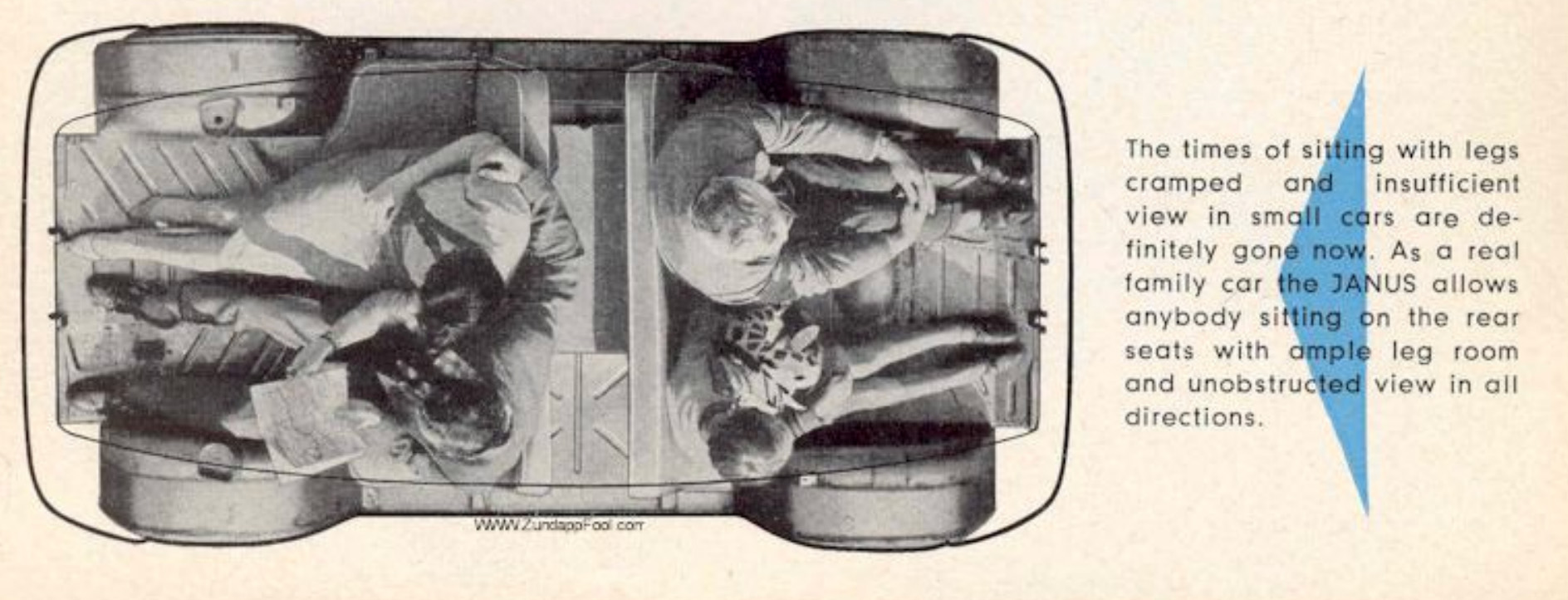
The odd layout remained the same: an engine in the very middle (a 245cc one-cylinder two-stroke making 14 hp and unique to the car) driving the rear wheels, some luggage space in the middle above and beside the engine (and fuel tank) and two bench seats, one facing forward, one aft.
The Janus was really like two Isettas mounted back-to-back and while it did look sort of strange, I think Zündapp’s designers did a good job of keeping it from looking that strange.
Image: Zundapp Fool
The amazing thing about the Janus is just how roomy it is inside; look at that diagram up there and you can see that there’s a surprising amount of legroom. It feels open and roomy inside, car more so than its exterior dimensions would suggest.
It’s a really clever out-of-the-box solution to the four-seat/a door for everyone family car problem, and in some ways I think it’s a shame the layout never caught on. I guess people like an easier way to talk to one another in different rows? You’d think that separation could be a plus.
Interestingly, when Dick Teague was first designing the AMC Pacer, one of his first ideas was to make something a lot like a ’70s-era Janus. Early sketches, like that one above, show a mid-mounted Wankel rotary engine and seats facing front and rear! The Pacer is already delightfully odd, but this would have been next-level. Some customizer really should make this sketch a reality.
These are both remarkable and clever cars, brilliant and offbeat solutions to the family car problem. I wish Beau could keep both, but I know how reality can be a jerk sometimes. So, what should he do? Sell both? Keep both? Keep one or the other? Let’s hear what you think!
The SEMA show in Las Vegas is coming up, and this massive industry event has given automakers an excuse to build wildly modified versions of real production cars. Nissan is joining the party with something called the Sentra Spec V concept, but there’s an asterisk for now. In an age of easily-generated slop, someone pulling the levers seems to have published images of this concept car with some anomalies. Let’s take a look.
While there may have been a Sentra Nismo available to buy as recently as 2019, that thing only offered 188 horsepower. To get a properly hot Sentra, you’re going to have to go back somewhere between 2012 and 1991 depending on your definition of hot. 2012 for the final year of the 200-horsepower Renault Megane-related SE-R Spec-V, 2006 for the final year of its predecessor, and 1991 for the first year of the original SE-R. The one that started it all.
On paper, a Sentra with a 300-horsepower two-liter turbocharged engine, a manual gearbox with a limited-slip differential, GT-R Recaro seats, massive Brembo brakes, and the requisite suspension mods sounds enormously tantalizing. Although it’s a one-off in its current form, it sounds a vision of what a Sentra fettled to fight the Honda Civic Type R and Hyundai Elantra N would be like. There’s just one problem: The photos Nissan’s released of it appear to, at the very least, have AI-generated components. Huh?
Photo credit: Nissan
Motor 1 was the first outlet to point out that something is off with these press photos, and the front-three-quarter shot above reveals something strange. Look at that C-pillar treatment. That’s not the current Sentra’s C-pillar treatment, and the trailing edge of the rear door glass is completely the wrong shape.
Photo credit: Nissan
Above is closer to what the greenhouse and C-Pillar are supposed to look like, but what’s going on with the front emblem?
Photo: Nissan (crop)
It should say “Nissan” but it just doesn’t. Instead, it looks like a series of mutated scribbles have replaced the text everyone expects to be there.
Photo credit: Nissan
Next up, here’s the profile shot Nissan provided, and there’s something obviously wrong here. That quarter window on the C-Pillar isn’t actually a window on a real Sentra, but instead just a piece of black plastic trim. Nevertheless, it’s rendered as actual glass here, with a transparent section and frit for bonding it to the C-pillar and all.
Photo: Nissan (crop)
Also, what is going on with the lug nut situation? All of them aren’t the same size or indeed, equidistant around each lug circle.
Photo credit: Nissan
Around back, that C-pillar applique continues to erroneously be rendered as an actual window, but there’s another bit of weirdness here. The Sentra Spec V concept supposedly comes on Yokohama Advan AD09 tires, but that’s not the tread pattern of the AD09 displayed in this photo. An AD09 has two wiggly circumferential grooves, while these tires have three straight ones and completely different lateral grooves.
Photo credit: Nissan
Moving to the interior: what’s going on with the Sparco logos on the passenger harness’s shoulder belts, along with the safety labelling further down on the harnesses? Those aren’t the right logos, and the text is completely illegible. These weren’t ultra-low-resolution images here, so fuzzy appearances of familiar letters should be discernible if these images were completely real.
Photo credit: Nissan
At least the engine shot looks legit – at first glance. But upon closer inspection, the text on the brake fluid reservoir cap has been reduced to mush that sure looks like an artifact of AI. What gives?
Needless to say, I’ve reached out to Nissan for comment on the matter, and will update this as soon as I hear more. Building something cool for SEMA is great, but releasing slop like this undermines the whole project by casting doubt on how much of this is legitimate. Also, you’d expect a project like this with a custom Bomex body kit to be built in CAD these days, so why not use those renderings for exterior teasers? Answers on a postcard…
UPDATE: We now have a statement from Nissan, and I’ve inserted the full thing below.
The Sentra Spec-V Concept is a physical vehicle that was photographed in a real-world garage setting. During post-production, AI-assisted editing tools were used to create and refine elements of the image backgrounds. In that process, unintended inaccuracies were introduced to some vehicle details in the published images.
We’re working with our creative partners to replace the affected assets with corrected imagery, and we appreciate the feedback that brought the issue to our attention. We regret any confusion the edited images may have caused.
The Sentra Spec-V Concept itself is exactly that: a real, physical concept vehicle. We look forward to showing it in person when it makes its SEMA debut next week.
Basically, it sounds like an external creative partner (it’s extremely uncommon for OEMs to have in-house photographers for shooting vehicle media sets) used AI tools to edit actual photographs, and this slop-affected set made it past review, all the way out to publication. On the one hand, it’s great that Nissan’s aware of the problem and is working to fix it. On the other, it’s hard not to wonder how these sloppified photos made it out in the first place.
 Log in



 reply
reply


 ,” a
,” a